Can you run dlt inside Snowflake? (Part 1/2: UDF)
So, dlt by dltHub runs "where Python runs"... I guess that means it should run in a Snowflake UDF, too. TL/DR: no, it doesn't 😎 But hey: negative results are results, too, right? 😅


TL/DR: Jein (= yes and no)
EDIT January 2026: Thanks to Waldemar's comments (below this post), who challenged my initial conclusion, I updated this post. It is now possible to run dlt inside a stored procedure in Snowflake! But it requires quite a lot of tinkering (including a custom dlt destination for Snowpark), but it works 😎
Meanwhile, using dlt in a container works, too, and requires a lot less customization:
 Martin Seifert
dlt by dlthub is (among others) promoted by a simple claim:
Run it where Python runs - on Airflow, serverless functions, notebooks. No external APIs, backends, or containers, scales on micro and large infra alike.
Since I use quite many Python UDFs and procedures in Snowflake, I thought: Maybe I can run dlt in a Python UDF/procedure in Snowflake?! But when I tried, there were a couple of obstacles in my way. And one blocker. In short: No, it's (to my knowledge) not possible to run dlt in a Python UDF/procedure.
Of course you can run it in a (Snowflake managed) Snowpark Container Services (SPCS) or a notebook using a container runtime. I mention this because technically you can run dlt in Snowflake this way. But it's not what I was looking for and, hence, not the topic of this post. So back to the UDF/procedure approach...
Let me explain why my approach failed:
Curated package
Since dlt is available as a curated package, it should be as simple to use it as this:
CREATE OR REPLACE PROCEDURE TEST_DLT()
RETURNS STRING
LANGUAGE PYTHON
RUNTIME_VERSION = 3.12
HANDLER = 'handler'
PACKAGES = ('dlt')
EXECUTE AS CALLER
AS
$$
import dlt

def handler():
    return dlt.__version__
$$;
Unfortunately this version of dlt (v1.17.1) in Snowflake has a requirement of a package (fastuuid) that is not compatible with snowflake-snowpark-python and fails even before the procedure is created (cf. snowflake.discourse.group).
So if I want to make dlt run in Snowflake, I would have to use a version independent from fastuuid. The current version (v1.20.0) doesn't require it, so maybe I should host the package myself and not use the curated verion.
Self-hosted package
Getting the current version (the .whl) from PyPi is easy enough. Then I brought it into Snowflake via a Stage:

Obviously Snowflake complains when I try to just add this self-hosted package to the procedure, because the package itself has lots of dependencies. And those are not in the package. This is the major reason why curated packages in Snowflake are so convenient: In addition to the package, Snowflake would also load all dependencies in the background.
Most of the dependencies can still be loaded via curated packages, just one (jsonpath_ng) was missing - so I also got this from PyPi and self-host it. The new procedure looks a little less convenient, but works:
CREATE OR REPLACE PROCEDURE TEST_DLT()
RETURNS STRING
LANGUAGE PYTHON
RUNTIME_VERSION = 3.12
HANDLER = 'handler'
PACKAGES = ('snowflake-snowpark-python','requests','pendulum','simplejson','PyYAML','semver','orjson','pydantic','pydantic-settings','packaging','typing-extensions','pyarrow','pandas','protobuf','attrs','tenacity','colorama','click','tqdm','structlog','jinja2','filelock','humanize','sqlglot','pathvalidate','fsspec','ply','giturlparse')
IMPORTS = ('@META.PYTHON.S_PYTHON/dlt-1.20.0-py3-none-any.whl','@META.PYTHON.S_PYTHON/jsonpath_ng-1.7.0-py3-none-any.whl')
EXECUTE AS CALLER
AS
$$
import sys
import_dir = sys._xoptions.get("snowflake_import_directory")

sys.path.append(import_dir + '/jsonpath_ng-1.7.0-py3-none-any.whl')
import jsonpath_ng

sys.path.append(import_dir + '/dlt-1.20.0-py3-none-any.whl')
import dlt

def handler(session):
    return dlt.__version__
$$;

CALL TEST_DLT();
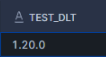
This will return the dlt version of the self-hosted package:
Run a dlt pipeline in a Snowflake procedure
Now, the next step would be to actually run a dlt pipeline using a procedure. The sketched procedure for loading Jira data into Snowflake (for instance) would look something like this (don't pin me on this - it won't work anyway, so I stopped the development of the script at the point where it failed 😅):
CREATE OR REPLACE PROCEDURE load_jira()
RETURNS STRING
LANGUAGE PYTHON
RUNTIME_VERSION = 3.12
HANDLER = 'handler'
PACKAGES = ('snowflake-snowpark-python','requests','pendulum','simplejson','PyYAML','semver','orjson','pydantic','pydantic-settings','packaging','typing-extensions','pyarrow','pandas','protobuf','attrs','tenacity','colorama','click','tqdm','structlog','jinja2','filelock','humanize','sqlglot','pathvalidate','fsspec','ply','giturlparse','jira','pluggy')
IMPORTS = ('@META.PYTHON.S_PYTHON/dlt-1.20.0-py3-none-any.whl','@META.PYTHON.S_PYTHON/jsonpath_ng-1.7.0-py3-none-any.whl')
EXECUTE AS CALLER
AS
$$
import sys
import_dir = sys._xoptions.get("snowflake_import_directory")

sys.path.append(import_dir + '/jsonpath_ng-1.7.0-py3-none-any.whl')
import jsonpath_ng

sys.path.append(import_dir + '/dlt-1.20.0-py3-none-any.whl')
import dlt

import jira

def handler(session):
    pipeline = dlt.pipeline(
        pipeline_name="jira_pipeline",
        destination="snowflake",
        dataset_name="jira",
        full_refresh=False,
    )

    src = jira(
        subdomain="[my subdomain]",
        email="[my user]",
        api_token="[my password]",
    )

    endpoints = ['issues'] # or: list(src.resources.keys())

    load_info = pipeline.run(src.with_resources(*endpoints))
$$;
But here is the catch:
And because of this, running the above procedure results in:
[Errno 30] Read-only file system: '/var/dlt' in function LOAD_JIRA with handler handler
Even if dlt doesn't store any (intermediate) data on the local filesystem, it still attempts to write some config and metadata (e.g. states and logs) to it. But the filesystem underlying such a Snowflake procedure is read-only.
I might very well have missed something and maybe dlt can run without write privileges or use external storage (blobs) instead of the file system. This is my personal trigger to continue the fundamentals course on dlthub.learnworlds.com and if I stand corrected, I'll post an update here 🤓
EDIT January 2026
Waldemar's comments below made me retry my UDF approach: With using snowflake.snowpark.pypi_shared_repository as the artifact repo and telling dlt to use ./tmp for temporary local storage, writing into the local filesystem (using DuckDB or Parquet or whatever) works fine.
But using dlt inside Snowflake i.m.h.o. only makes sense if I can use the Snowflake destination of dlt (to benefit from it's automatic schema evolution, logging, etc.). And while that works fine in a containerized pipeline (cf. part 2: SPCS), there still is an incompatibility issue when running inside a stored procedure:
CREATE OR REPLACE PROCEDURE sandbox.dlt.p_test_dlt_snowflake()
RETURNS VARCHAR
LANGUAGE PYTHON
RUNTIME_VERSION = '3.11'
HANDLER = 'test_dlt'
ARTIFACT_REPOSITORY = snowflake.snowpark.pypi_shared_repository
PACKAGES = ('snowflake-snowpark-python', 'dlt[snowflake]')
COMMENT = 'Test dlt with Snowflake destination in stored procedure'
EXTERNAL_ACCESS_INTEGRATIONS = (i_jira_dlt)
AS
$$
def test_dlt(snowpark_session):
    import dlt
    import json
    from datetime import datetime

    try:
        # Simple test data - just a few JSON documents
        test_data = [
            {"id": 1, "name": "Test Item 1", "created_at": "2026-01-01T10:00:00Z"},
            {"id": 2, "name": "Test Item 2", "created_at": "2026-01-02T11:00:00Z"},
            {"id": 3, "name": "Test Item 3", "created_at": "2026-01-03T12:00:00Z"}
        ]

        # Configure dlt Snowflake destination
        pipeline = dlt.pipeline(
            pipeline_name="test_pipeline",
            destination=dlt.destinations.snowflake(
                credentials={
                    "database": "SANDBOX",
                    "warehouse": "[my warehouse]",
                    "role": "SYSADMIN",
                    "host": "[my account identifier]",
                    "username": "[my dlt service user]",
                    "password": "[my dlt service user PAT]",
                }
            ),
            dataset_name="dlt",
            pipelines_dir="/tmp/dlt_pipelines"
        )

        # Create a simple dlt resource
        @dlt.resource(name="test_table", write_disposition="replace")
        def test_resource():
            yield test_data

        # Run the pipeline
        load_info = pipeline.run(test_resource())

        result = {
            "status": "success",
            "rows_loaded": len(test_data),
            "load_info": {
                "dataset_name": load_info.dataset_name,
                "started_at": str(load_info.started_at) if load_info.started_at else None,
                "finished_at": str(load_info.finished_at) if load_info.finished_at else None,
            }
        }

        return json.dumps(result, indent=2)

    except Exception as e:
        import traceback
        error_result = {
            "status": "error",
            "error_type": type(e).__name__,
            "error_message": str(e),
            "traceback": traceback.format_exc()
        }
        return json.dumps(error_result, indent=2)
$$;
This procedure is supposed to simply write some sample data into a Snowflake table. This works fine when running locally (or containerized, I presume), but not in a Snowflake procedure. The issue:
Pipeline execution failed at `step=sync` with exception:

<class 'dlt.destinations.exceptions.DatabaseTransientException'>
001003 (42000): SQL compilation error:
syntax error line 1 at position 217 unexpected '%'.
So it loads the sample data and when it's attempting to connect to Snowflake from inside the dlt pipeline, it fails. The issue is that dlt is using curr.execute(query, db_args, num_statements=0) with parameter substitution and Snowflake's Python connector. Using the Python connector from inside a Snowpark procedure just doesn't make sense and hence errors out. This appears to be a fundamental incompatibility between plain dlt and Snowflake when running inside a stored procedure.
Again, using a hybrid approach using dlt to store the data locally and then load it into a Snowflake table (via Snowpark dataframes) works, but if I only can use dlt for the first half of the pipeline, what's the point? I could just as well use native connectors/libraries instead.
At this point, Waldemar offered yet another solution: A custom Snowpark loader for dlt:
 waldekkot
The idea is to not use the Snowflake Python connector when running inside a procedure, but use a Snowpark dataframe as destination for the loaded data and materialize this dataframe in Snowflake.
This works very well if the target table shall just be appended or replaced. Delta-loads are currently not possible with Waldemar's custom loader. Also, it currently doesn't infer the column types from the source data. If those features are added, this should be a practical solution for running dlt inside a procedure.
However, a @dlt.destination custom decorator destination client doesn't inherit from WithStateSync and can't check for the pipeline state in the destination. This would be required for real dlt-like incremental loads. Implementing a true WithStateSync class would be relatively complex (though possible), but also be utilizing many dlt-internal APIs - and, hence, would be closely coupled to future dlt changes. The maintenance effort would be significant.
This is why Waldemar implemented a wrapper function around dlt's dlt.pipeline(). Such a wrapper can be extended to read and write the pipeline state in the destination, to persist the state across stored procedure calls, but would still lack automatic schema restoration and migration, so still not be a real dlt destination.
But hey, we got this far, so why stop there? Let's actually create a custom dlt destination built upon the internal dlt APIs - basically replacing the built-in Snowflake destination (using Snowflake's Python API) with a custom Snowpark destination - I used the built-in Snowflake destination of dlt as a template and replaced all parts using the Python API with Snowpark-compatible code. The result looks something like this:
 martinseifertprojuventute
This custom destination works (in my narrow use case syncing Jira data to Snowflake tables, including delta loads and schema migrations), but isn't tested thoroughly, so please use with care does 😎