
dltHub notifies Slack and email. But my org runs on Teams 😩
dltHub ships Slack and email alerts out of the box. My org runs on Teams, so I built the third one myself and wired it into all ~70 pipelines with one decorator shadow.


TL/DR: dltHub ships built-in notifications for Slack and email. Nice! But my org (for better or worse) runs on Microsoft Teams (well, ok, mostly worse...). So I built a small helper that mirrors the pattern, then shadowed the @job decorator so all my pipelines get failure alerts.
My dltHub workspace runs about 70 jobs. And many of them share some code already:
 Martin Seifert
The pipelines rarely ever fail. If they do, it's usually some credential issues (API creds to rotate) or a significant change the the source API. But if and when one fails at 2:30 in the night, I want to be able to fix it first in the morning, not after someone notices stale data.
dltHub recently added notifications (currently in public preview): Slack notifications and email notifications... Both are good starting points, but neither of them points to Teams 😅
 Matthaus Krzykowski
What dltHub ships out of the box
The Slack helper is simple: send_slack_message posts to a Slack webhook, the URL lives under [runtime] slack_incoming_hook in secrets and is exposed at runtime as pipeline.runtime_config.slack_incoming_hook. That works, because slack_incoming_hook is a defined field in dlt's RuntimeConfiguration.
The email helper is a little more manual, using plain smtplib against SMTP with credentials in a custom secrets section:
[notifications.email]
host = "smtp.example.com"
port = 587
sender = "you@example.com"
recipient = "you@example.com"
password = "abcdefghijklmnop"
Both patterns wrap a pipeline run in try/except: send a success card (Or don't! Who wants to be notified if all is good? 🙄) or catch the exception, send a failure card, and then re-raise the exception so the job state doesn't turn green.
Teams doesn't speak webhook the same way
... of course not. Why would it? 😅
Slack's incoming webhook accepts a flat JSON blob with a text key. Teams (via a "Post to a channel when a webhook request is received" workflow) wants either the legacy Office-365 MessageCard format or an adaptive card, wrapped like this:
{
  "type": "message",
  "attachments": [
    {
      "contentType": "application/vnd.microsoft.card.adaptive",
      "content": { "...": "adaptive card JSON" }
    }
  ]
}
To set this up in Teams, I created a workflow (or, if you prefer to set this up in Power Automate, it's the same thing, just more manual work) based on the template titled "Post to a channel when a webhook request is received", picked the destination channel, and the flow handed back an invoke URL like this:
https://<env>.environment.api.powerplatform.com/powerautomate/automations/direct/<org>/workflows/<id>/triggers/manual/paths/invoke?...&sig=<secret>
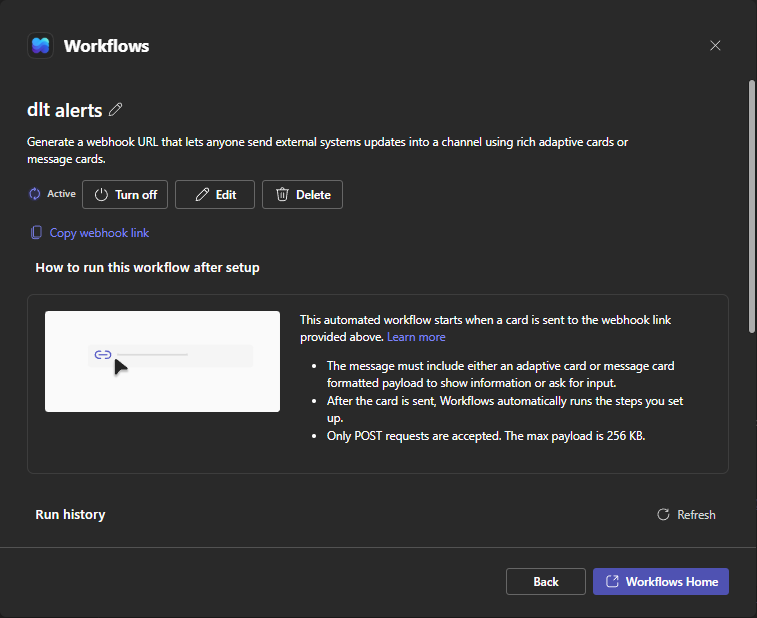
I then added the whole URL (including its sig) as credential into secrets.toml.
One helper, shaped like the docs
I mirrored the official email pattern for where the credential lives and added a custom secrets section. Such custom sections are free-form dicts:
[notifications.teams]
webhook_url = "https://<env>.environment.api.powerplatform.com:443/powerautomate/automations/direct/<org>/workflows/<id>/triggers/manual/paths/invoke?api-version=1&sp=%2Ftriggers%2Fmanual%2Frun&sv=1.0&sig=<secret>"[runtime]: the slack_incoming_hook is a defined field on dlt's RuntimeConfiguration, but a teams_webhook_url key under [runtime] would be off-spec and dlt flags unknown keys there.The secret can then be read lazily via dlt.secrets[...] (same as the email example), so importing the module never fails when the secret is absent... This will be relevant later, when this gets imported inside an except block 😉
The helper itself copies many elements of dlt's own send_slack_message (dlt/common/runtime/slack.py): raise_for_status() on any error code >= 400, add a timeout so a dead webhook can never hang a job, everything wired through a requests.Session:
"""Reusable helper: post an adaptive card to a Teams channel via a Power
Automate webhook. Mirrors dlt's send_slack_message. The webhook URL
(including sig=) is the credential, lives in .dlt/secrets.toml under
[notifications.teams], read lazily via dlt.secrets."""

import dlt

LOGO_URL = "https://dlthub.com/docs/img/dlthub-logo.png"


def send_teams_message(
    title: str,
    text: str,
    webhook_url: str | None = None,
    url: str | None = None,
) -> None:
    import requests
    from dlt.common import logger
    from dlt.common.json import json

    hook_url = webhook_url or dlt.secrets["notifications.teams.webhook_url"]
    content = {
        "$schema": "http://adaptivecards.io/schemas/adaptive-card.json",
        "type": "AdaptiveCard",
        "version": "1.4",
        "body": [
            {
                "type": "ColumnSet",
                "columns": [
                    {
                        "type": "Column",
                        "width": "auto",
                        "items": [
                            {"type": "Image", "url": LOGO_URL, "altText": "dltHub", "size": "Small"}
                        ],
                        "verticalContentAlignment": "Center",
                    },
                    {
                        "type": "Column",
                        "width": "stretch",
                        "items": [
                            {"type": "TextBlock", "size": "Medium", "weight": "Bolder", "text": title},
                            {"type": "TextBlock", "text": text, "wrap": True},
                        ],
                        "verticalContentAlignment": "Center",
                    },
                ],
            }
        ],
    }
    if url:
        content["actions"] = [
            {"type": "Action.OpenUrl", "title": "Open failed run", "url": url}
        ]
    payload = {
        "type": "message",
        "attachments": [
            {"contentType": "application/vnd.microsoft.card.adaptive", "content": content}
        ],
    }
    session = requests.Session()
    session.trust_env = False
    r = session.post(
        hook_url,
        data=json.dumps(payload).encode("utf-8"),
        headers={"Content-Type": "application/json;charset=utf-8"},
        timeout=30,
    )
    if r.status_code >= 400:
        logger.warning(f"Could not post the notification to teams: {r.status_code}")
    r.raise_for_status()
The notification itself contains the dltHub logo (who says notifications have to be boring plain text?) and presents a link (at the button) to the failed run so I can immediately jump into the ui if I want to have a look.
session.trust_env = False because I usually route egress traffic through a Squid proxy. Since a dead proxy might very well be a reason for a failed pipeline, I need the failure notification to bypass it and reach me.To construct the URL for the button, I reimplemented 8 lines from dlt_runtime.urls.job_run_url(), because I didn't want to pull in the platform plugin as a dependency (so I can test-run everything locally). But I might change my mind on this decision if dltHub breaks my URL constructor in the future (which most certainly will happen at some point - everybody changes URLs in their apps sometimes 😅):
def _job_run_url():
    """Deep link to the current dltHub run, or None when not running on the platform."""
    try:
        from urllib.parse import quote
        from dlt._workspace._workspace_context import active

        cfg = active().runtime_config
        if not cfg.workspace_id or not cfg.run_id:
            return None
        base = cfg.api_base_url or "https://api.dlthub.com"
        host = "https://app.dlthub.com" if base.startswith("https://api.dlthub.com") else base.replace("api.", "", 1)
        return f"{host}/w/{quote(str(cfg.workspace_id), safe='')}/runs/{quote(str(cfg.run_id), safe='')}"
    except Exception:
        return None
So now I have to wire this into every pipeline?
Currently, dltHub doesn't have a native "any job fails" trigger. The job_fail(job_ref) trigger takes exactly one jobs.<section>.<name> reference, and each job gets exactly trigger. Obviously, I didn't want to wire my helper into each of my ~70 jobs... Adding a try/except (plus the import, plus the URL lookup) to every trampoline in __deployment__.py would be ~70 almost identical edits and snippets to be maintained and places to get it wrong. Hmmm... 🤔
dltHub's @job decorator returns a JobFactory bound to the pipeline function via bind(f). When a job is deployed, the launcher resolves jobs through that factory and an entry point by name. That means, if I put a wrapper around all jobs, as long as the wrapper preserves __name__/__qualname__ (plain functools.wraps does that), it can sit between the pipeline function and the real @job decorator without dltHub even noticing. In my __deployment__.py I added this:
import functools
from dlt._workspace.deployment.decorators import job as _dlthub_job


def job(*args, **kwargs):
    """dltHub @job decorator that posts a Teams card when the job raises.

    Shadows the upstream @job decorator so every trampoline below gets the
    failure alert without per-pipeline wiring. The wrapped function re-raises
    after notifying, so dltHub still records the run as FAILED."""
    def decorator(fn):
        @functools.wraps(fn)
        def wrapped(*a, **kw):
            try:
                return fn(*a, **kw)
            except Exception as e:
                try:
                    from _teams_notify_common import send_teams_message
                    send_teams_message(
                        f"Job run failed: {fn.__name__}",
                        f"{type(e).__name__}: {e}",
                        url=_job_run_url(),
                    )
                except Exception as notify_err:
                    print(f"Failed to send Teams notification for {fn.__name__}: {notify_err}")
                raise
        return _dlthub_job(*args, **kwargs)(wrapped)
    return decorator
Every trampoline further down in the __deployment__.py file keeps using @job(trigger=schedule(...), execute={"timeout": "10m"}) as usual, but now they're calling this new local job, not the dltHub one. And they never have to know the difference 🤫
The notify call itself is wrapped in its own try/except on purpose: a missing secret, a dead webhook, or a network blip must never mask the real pipeline error. If the notification fails, a print statement shows up in the logs, and the original exception still propagates and fails the job run.
wrapped() are imported lazily. Some pipeline modules set global dlt config at import time (for example dlt.config["schema.naming"] = "sql_ci_v1"), and merely deploying/importing the manifest should not pull in _teams_notify_common.Verifying it without waiting for a real failure
To test the whole alert path without waiting for the next failed Job, I created a job that always fails:
@job(execute={"timeout": "10m"})
def test_fail_alert():
    """Deliberately raises to test the Teams failure notification."""
    raise RuntimeError("deliberate failure to test the Teams alert")
Then I deployed and tested everything end to end:
dlthub deploy --non-interactive
dlthub job run jobs.__deployment__.test_fail_alert --non-interactive
dlthub job logs jobs.__deployment__.test_fail_alert 1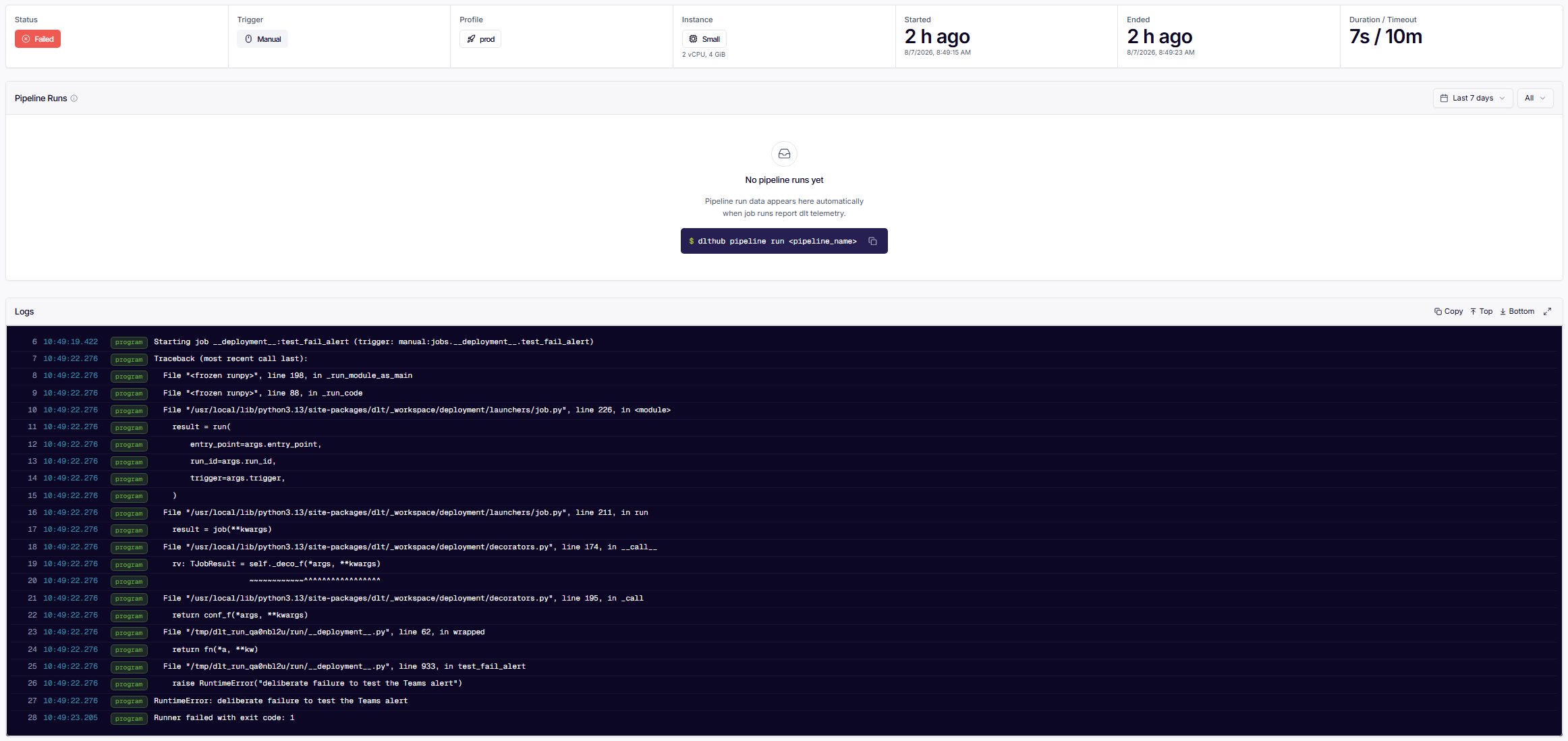
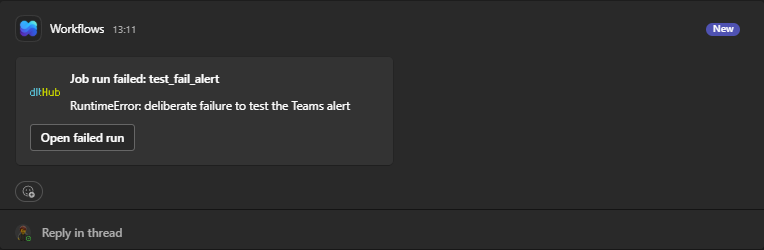
The run failed as expected and the card showed up in Teams with the logo, the job name, the exception, and the button that opened the failed run.
And that's it: a new notification helper, wired into every pipeline through the same decorator that already schedules them, without touching a single trampoline individually. Slack and email cover most orgs, Teams needed 100 lines and a workflow.
Now, how do I teach my agent to auto-heal my pipelines? To be continued... 😎