Parent-child-hierarchy in Snowflake and Tableau
Recursive queries and hierarchies in Snowflake and Tableau

What is a parent-child-hierarchy?
There are multiple possibilities for hierarchical dimensions (balanced, unbalanced, ragged), but all have something in common: In one way or another, they describe parent-child-relationships.
A typical example would be date dimensions with Year being the parent of Quarter being the parent of Month being the parent of Day. Another example, and the one I'll be using here, describes the relationship/hierarchy of "Campaigns" (a very commonly used object) in Salesforce.
In a non-profit setup of Salesforce (with the "Non Profit Success Pack" or, soon, the currently developed "Non Profit Cloud"), there is an object called "Recurring Donations" (RD) describing contracts with donors who pledge to donate every month or year or so. Those donations are likely collected automatically.
Each RD is (or should be) attributed to a Salesforce Campaign. However, if you want to aggregate something about those RDs by Campaigns, the Campaign hierarchy comes into play. Salesforce Campaigns have up to 5 levels, each campaign referencing it's parent (if it has one). The Salesforce UI displays them like this:

Modeling in Snowflake
Salesforce already calculates some facts by default. Other facts could be calculated with custom fields inside each level of the hierarchy. However, if you're anything like me, you don't necessarily want to calculate every possible measure inside your operative systems, but rather in a separate analytical environment. For this example, let's assume you synced the two Salesforce tables "Campaign" and "Recurring Donation" to Snowflake, where you now want to model the parent-child-relationship of those Campaigns to be ale to filter on any level in the hierarchy and aggregate the count of RDs (or something else).
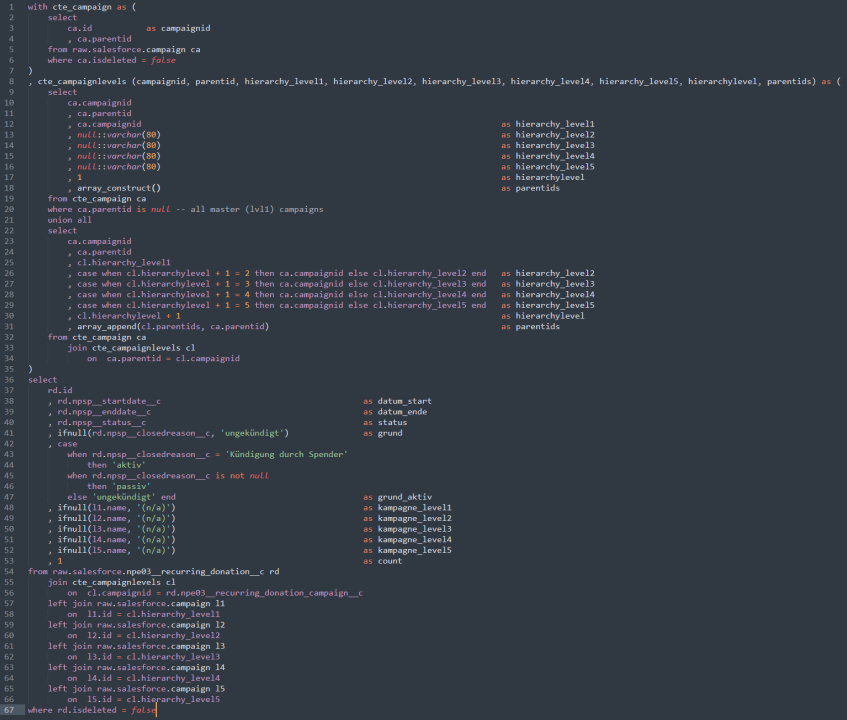
The parent-child-relationship can be used in a recursive query in Snowflake. I personally like to use recursive CTEs as they can be used in other databases, too, so let's create the hierarchy! The first part will simply collect all (non-deleted) campaigns and their parents:
with cte_campaign as (
    select
        ca.id           as campaignid
        , ca.parentid
    from raw.salesforce.campaign ca
    where ca.isdeleted = false
)
[...]
Second, we'll identify all the top-level Campaigns (those without any parent) and from there recursively walk down each branch of the hierarchy (again: max 5 levels in this use case) to get a flat table of all Campaigns and all their ancestors:
[...]
, cte_campaignlevels (campaignid, parentid, hierarchy_level1, hierarchy_level2, hierarchy_level3, hierarchy_level4, hierarchy_level5, hierarchylevel, parentids) as (
    select
        ca.campaignid
        , ca.parentid
        , ca.campaignid                                                                         as hierarchy_level1
        , null::varchar(80)                                                                     as hierarchy_level2
        , null::varchar(80)                                                                     as hierarchy_level3
        , null::varchar(80)                                                                     as hierarchy_level4
        , null::varchar(80)                                                                     as hierarchy_level5
        , 1                                                                                     as hierarchylevel
        , array_construct()                                                                     as parentids
    from cte_campaign ca
    where ca.parentid is null -- all master (lvl1) campaigns
    union all
    select
        ca.campaignid
        , ca.parentid
        , cl.hierarchy_level1
        , case when cl.hierarchylevel + 1 = 2 then ca.campaignid else cl.hierarchy_level2 end   as hierarchy_level2
        , case when cl.hierarchylevel + 1 = 3 then ca.campaignid else cl.hierarchy_level3 end   as hierarchy_level3
        , case when cl.hierarchylevel + 1 = 4 then ca.campaignid else cl.hierarchy_level4 end   as hierarchy_level4
        , case when cl.hierarchylevel + 1 = 5 then ca.campaignid else cl.hierarchy_level5 end   as hierarchy_level5
        , cl.hierarchylevel + 1                                                                 as hierarchylevel
        , array_append(cl.parentids, ca.parentid)                                               as parentids
    from cte_campaign ca
        join cte_campaignlevels cl
            on  ca.parentid = cl.campaignid
)
[...]
Third, we'll join this flat Campaign table to the RDs. This results in a table of all RDs, their corresponding Campaigns and all the parents of those Campaigns:
[...]
select
    rd.id
    , rd.npsp__startdate__c                                         as datum_start
    , rd.npsp__enddate__c                                           as datum_ende
    , rd.npsp__status__c                                            as status
    , ifnull(rd.npsp__closedreason__c, 'ungekündigt')               as grund
    , case
        when rd.npsp__closedreason__c = 'Kündigung durch Spender'
            then 'aktiv'
        when rd.npsp__closedreason__c is not null
            then 'passiv'
        else 'ungekündigt' end                                      as grund_aktiv
    , ifnull(l1.name, '(n/a)')                                      as kampagne_level1
    , ifnull(l2.name, '(n/a)')                                      as kampagne_level2
    , ifnull(l3.name, '(n/a)')                                      as kampagne_level3
    , ifnull(l4.name, '(n/a)')                                      as kampagne_level4
    , ifnull(l5.name, '(n/a)')                                      as kampagne_level5
    , 1                                                             as count
from raw.salesforce.npe03__recurring_donation__c rd
    join cte_campaignlevels cl
        on  cl.campaignid = rd.npe03__recurring_donation_campaign__c
    left join raw.salesforce.campaign l1
        on  l1.id = cl.hierarchy_level1
    left join raw.salesforce.campaign l2
        on  l2.id = cl.hierarchy_level2
    left join raw.salesforce.campaign l3
        on  l3.id = cl.hierarchy_level3
    left join raw.salesforce.campaign l4
        on  l4.id = cl.hierarchy_level4
    left join raw.salesforce.campaign l5
        on  l5.id = cl.hierarchy_level5
where rd.isdeleted = false
(Don't be too scared of the German field values and column names. After all, the consumers of the data are German speaking and so I already model the data in their language. Because I'm lazy 😎)
This last part also adds in some other dimensions: the start- and end-date of each RD, it's status and a reason for it being cancelled (if it is).
Side note: Snowflake has this neat connect by functionality to deal with hierarchies - why not utilize it here? As I said, I wanted to stay compatible with other DBs. The same result can be achieved with this functionality, too, but it would involve some string-splitting of the sys_connect_by_path to get the path into columns. Hence, here is just the first half of the connect-by-version in case you want to compare yourself:
with cte_campaign as (
  select
    ca.id         as campaignid
    , ca.parentid
    , ca.name
  from raw.salesforce.campaign ca
  where ca.isdeleted = false
)
select
  campaignid
  , name
  , parentid
  , sys_connect_by_path(name, ' -> ') as path
  , connect_by_root name              as name_master
  , level
from cte_campaign
start with parentid is null
connect by parentid = prior campaignid
Now we have a query (stored as a view in Snowflake) we can plug in Tableau.
Visualize in Tableau
To visualize this data, let's simply draw a pivot table on start- and end-dates, effectively identifying the time until an RD is (for whatever reason) terminated:

Nothing fancy in here, but what about the Campaign hierarchy we built earlier? Tableau lacks the capability to natively build a filter with hierarchies. Of course I could build a separate sheet visualizing the campaigns in some hierarchical way and use that sheet as a filter for the pivot table above. But there is another way:
The very talented people at Infotopics | Apps for Tableau built a free (🥳) extension to do just that:
🔗 appsfortableau.infotopics.com/extensions-for-tableau/hierarchyfilter
With this hierarchy-filter in a dashboard, the viewer can easily drill into Campaigns:

And we finally arrived: From a hierarchical dimension in Salesforce via recursive SQL in Snowflake to a hierarchy filter in Tableau.