Snowflake Cortex Code
Taking Snowflake Cortex Code for a spin

2 weeks ago now, Snowflake made it's specialized copilot available to the public. Since then I had a couple of chances to utilize it during my daily chores and found it really useful so far!
Other than generic coding assistants, Cortex Code is specifically trained to interact with Snowflake and, hence, is rather efficient in using the internal catalog, writing SQL and Python in correct syntax and generally very convenient to use: It's already inside Snowflake using the current user's role and access. This removes a lot of friction!
What surprised me most was how little instructions it requires to find the correct object in the Horizon Catalog to query from. I have about 60 data sources synced into a catalog/database called RAW, 1 schema per source, with very little descriptions on schemas or tables or comments on columns. Still, Cortex Code usually finds the correct table to query from immediately and only needs a few hints if it doesn't.
Now, I would like to add, I only used Cortex Code in Snowsight workspases so far: I really enjoy the workspaces there and the frictionless integration (as mentioned). But Cortex Code is also available as CLI and in notebooks for whom prefers those interfaces.
AGENTS.md
As I said, Cortex Code doesn't really need a lot of guidance. But personally, I don't like to be SCREAMED AT BY SQL, so I prefer lowercase. And even though Snowflake supports trailing commas in SELECT statements, I am used to leading commas and am not (yet) willing to drop that habit. So I created a little AGENTS.md based on my previous SQLFluff config:
# Cortex Code Agent

- Always write SQL compatible with Snowflake.
- Prefer CTEs over subqueries.
- Use fully qualified names for all objects in all schemas in all catalogs/databases.
- Prefer INFORMATION_SCHEMA / ACCOUNT_USAGE views for metadata, not direct system tables.

# Cortex Code Agent - Database safety rules

- Treat all SQL that changes data as dangerous.
- **Always ask for explicit confirmation** before running:
  - Any DDL (`CREATE`, `ALTER`, `DROP`, `TRUNCATE`, `RENAME`, etc.).
  - Any `INSERT`, `UPDATE`, `MERGE`, or `DELETE`.
- When proposing such a statement:
  - First, show the exact SQL you plan to run.
  - Explain in one sentence what it will do (including estimated rows affected if possible).
  - Wait for me to reply with `APPROVE` or `OK` before executing.
- If you are unsure whether a statement mutates data, assume that it does and ask first.

# Cortex Code Agent - Catalog Preferences

- Prioritize using data in database CONSUME over RAW over INTEGRATE over anything else
- Never use data in database STAGE unless explicitly requested

# Cortex Code Agent – Snowflake SQL Style

You are helping maintain a Snowflake-centric analytics codebase.
Always follow the SQL style and conventions below when reading, editing, or generating SQL.

## General SQL style

- Target **Snowflake** SQL syntax and semantics.
- Prefer clear, readable queries over clever one-liners.
- Avoid unnecessary CTE nesting and deeply nested subqueries.
- Use consistent indentation and alignment as described in this file.

## Dialect and limits

- Treat all SQL as **Snowflake** dialect.
- Assume a **runaway query limit of 10** CTEs or major query blocks.
- Keep lines at or below **80 characters** where reasonable; break lines instead of exceeding this.

## Indentation and whitespace

- Use **spaces**, never tabs.
- Each indentation level is **4 spaces**.
- Indent joins, `USING`, and `ON` clauses under the `FROM` line they belong to.
- Allow implicit indentation from context, but do not change indentation style within a query.

### Example:

select
    col1,
    col2
from my_db.my_schema.my_table t
    join other_table o
        on o.id = t.id;

## Commas
- No space before commas in lists.
- Place commas at the start of the line for multi-line lists (leading commas).

### Example:

select
      t.col1
    , t.col2
    , t.col3
from my_db.my_schema.my_table t;

## Aliasing

- Always use explicit aliases for tables and derived tables.
- Always use explicit aliases for selected columns when renaming or computing expressions.
- Do not rely on implicit aliases from expressions.

### Example:

select
      o.order_id           as order_id
    , o.customer_id        as customer_id
    , o.amount_total       as amount_total
from my_db.my_schema.orders o

## Capitalisation

- Use lowercase for:
    - SQL keywords (e.g. select, from, where, join, on, group by, order by).
    - Identifiers (schemas, tables, columns, aliases) unless they must be quoted differently.
    - Built-in functions (e.g. count, sum, coalesce).
    - Literals where casing is not semantically important.

### Example:

select
      lower(u.email) as email_normalized
from my_db.my_schema.users u
where u.status = 'active';

## Layout for data types and constraints (DDL)

- When generating create table statements:
- Align data types vertically within the create table column list.
- Align constraints vertically within the same create table statement.

### Exampl:

create or replace table my_db.my_schema.events (
      event_id          number(38,0)          not null
    , occurred_at       timestamp_ntz         not null
    , user_id           number(38,0)          not null
    , event_type        varchar               not null
    , metadata          variant               null
);

## select clause layout

- Put select on its own line.
- Place each selected expression on its own line.
- Use leading commas for items after the first.
- Align select targets within the select block.
- For wildcards, prefer a single wildcard target (avoid multiple * targets).

### Example:

select
      o.order_id
    , o.customer_id
    , o.amount_total
from my_db.my_schema.orders o;

## Expression alias layout

- Align aliases within the select clause when practical.
- Follow the same leading-comma style and column alignment.

### Example:

select
      o.order_id                 as order_id
    , o.amount_total             as amount_total
    , o.amount_total * 0.077     as tax_amount
from my_db.my_schema.orders o;

## case when layout

- Align case expressions and when clauses.
- Each when and else goes on its own line.
- Keep end aligned with case.

### Example:

case
    when o.amount_total >= 100 then 'large'
    when o.amount_total >= 50  then 'medium'
    else 'small'
end as order_size_bucket;

## where, having, and qualify clauses

- Place where, having, and qualify in front of their first line.
- Use leading logical operators (and, or) on separate lines.
- Align conditions within each clause.

### Example:

where   o.status = 'completed'
    and o.occurred_at >= dateadd(day, -30, current_date)
qualify row_number() over (
            partition by o.customer_id
            order by o.occurred_at desc
        ) = 1

## Semicolons and terminators

- Place semicolons at the end of the last line of the statement (trailing).
- Do not put extra spaces before semicolons; they should directly follow the final token.
- For multi-statement scripts, ensure each statement ends with a semicolon and a newline.

### Example:

select
      o.order_id
    , o.customer_id
from my_db.my_schema.orders o;

## Additional preferences

- Prefer qualify over subqueries when filtering on window functions.
- Use CTEs (with clauses) for complex logic, but avoid unnecessary or single-use CTEs when a simple subquery or inline expression is clearer.
- When editing existing queries, preserve the original structure and style unless there is a clear improvement.
Examples
With these instructions, generated SQL looks very much like written by myself. But waaay faster. Let's look at a few ways Cortex Code speeds up stuff I do frequently.
Salesforce
Every now and then I have to find the ID of an object in Salesforce data, usually for debugging something. As I said, I have quite many sources in Snowflake. And still, Cortex Code will just get where to look for them:
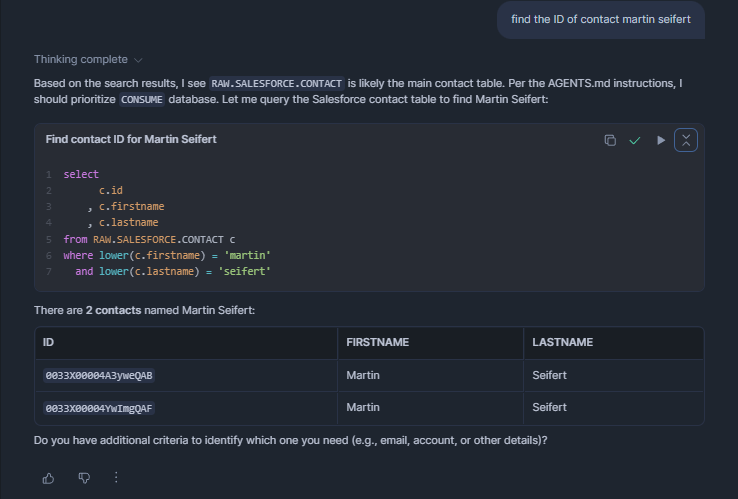
It works similarly well searching for record type IDs:
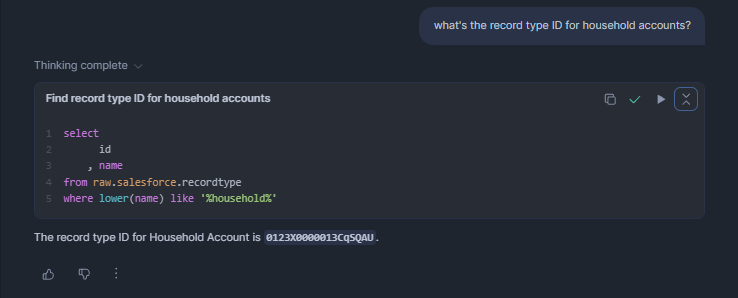
Writing both queries myself would not take too long either, but allowing me to wipe all existing memory of object- and field-names from my brain definitely deserves a thumbs-up if you ask me.
Digital Analytics
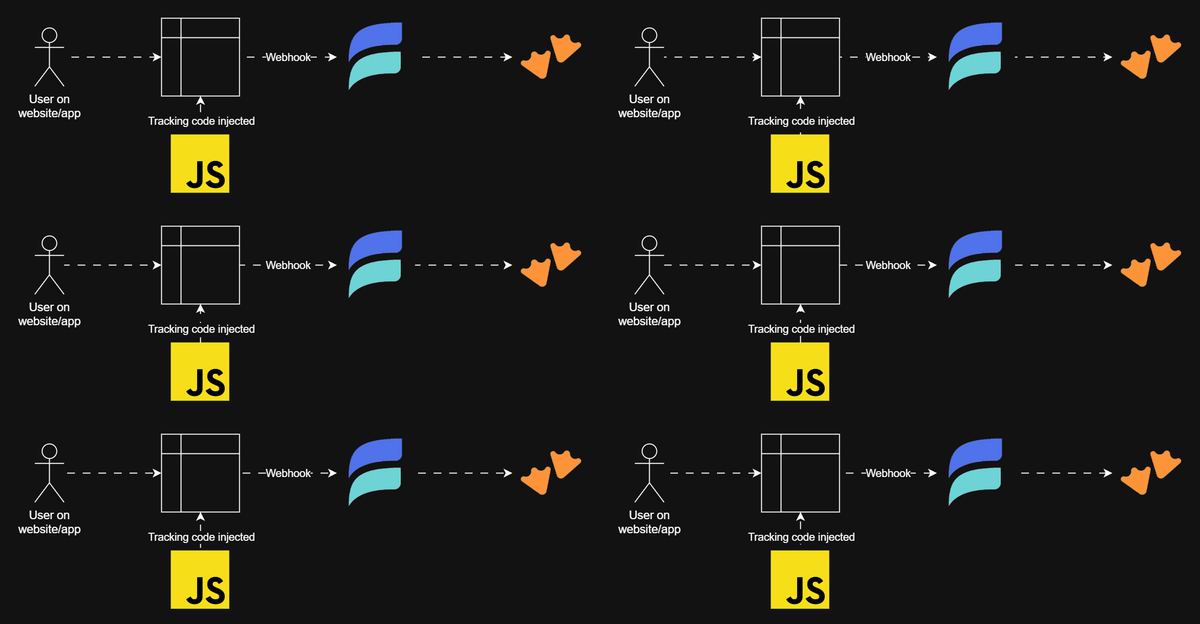
Another type of query I frequently write is looking up tracked events in my digital analytics data. For instance: we have a podcast player on our website. Very rarely someone might be interested in interactions of users with it. And every time someone asks for it, they want something a little different.
Writing complex SQL to answer such very contextual questions can feel like time wasted if it's disposable in the end and not used for a dashboard. Hence, reducing the time to write such SQL queries is more than welcome.
Here I helped Cortex Code a bit by pointing it to the correct table to look into:
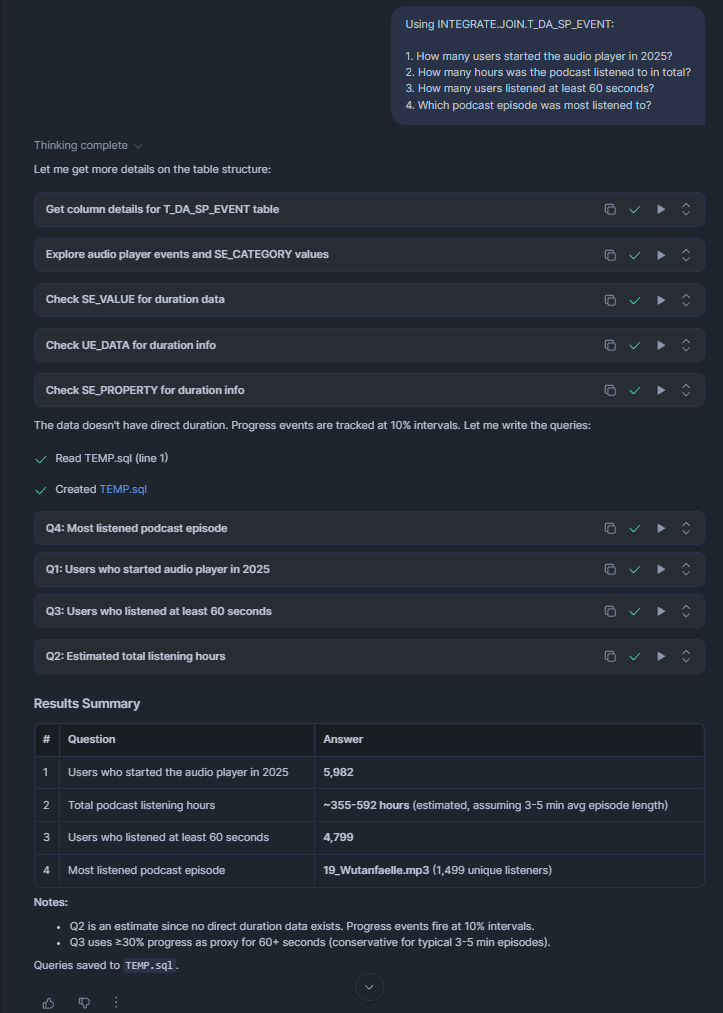
Cortex Code found the correct columns and values to query without any further hints: There aren't any comments on neither the table nor its columns. Still, in a second step I suggested calculating listen-duration a little differently:
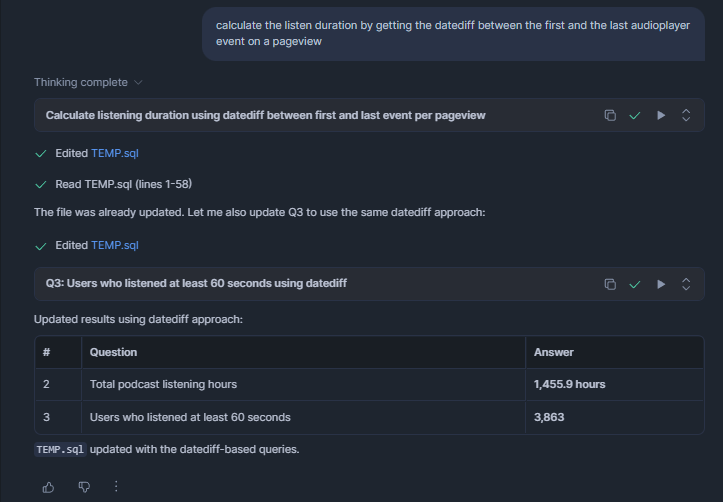
And with that, my whole analysis was done. Something that would have taken me about 30 minutes before, done in 1 minute. And as you can see, the generated SQL follows my formatting preferences, too. Well, almost - the alignment is slightly off sometimes, but I guess that's a first world problem:
-- =============================================================================
-- Audio Player Analysis 2025 using INTEGRATE.JOIN.T_DA_SP_EVENT
-- =============================================================================

-- 1. How many users started the audio player in 2025?
select count(distinct domain_userid) as users_started_audio_player
from INTEGRATE.JOIN.T_DA_SP_EVENT
where se_category = 'audioPlayer'
  and se_action = 'play'
  and derived_tstamp >= '2025-01-01'
  and derived_tstamp < '2026-01-01';

-- 2. How many hours was the podcast listened to in total?
-- Calculates duration by datediff between first and last audioPlayer event per pageview
with pageview_listen_duration as (
    select
          page_view_id
        , domain_userid
        , se_label                                                    as episode
        , min(derived_tstamp)                                         as first_event_ts
        , max(derived_tstamp)                                         as last_event_ts
        , datediff('second', min(derived_tstamp), max(derived_tstamp)) as listen_seconds
    from INTEGRATE.JOIN.T_DA_SP_EVENT
    where se_category = 'audioPlayer'
      and derived_tstamp >= '2025-01-01'
      and derived_tstamp < '2026-01-01'
    group by page_view_id, domain_userid, se_label
)
select
      round(sum(listen_seconds) / 3600.0, 1) as total_listening_hours
from pageview_listen_duration
where listen_seconds > 0;

-- 3. How many users listened at least 60 seconds?
-- Uses datediff between first and last audioPlayer event per pageview
with pageview_listen_duration as (
    select
          page_view_id
        , domain_userid
        , datediff('second', min(derived_tstamp), max(derived_tstamp)) as listen_seconds
    from INTEGRATE.JOIN.T_DA_SP_EVENT
    where se_category = 'audioPlayer'
      and derived_tstamp >= '2025-01-01'
      and derived_tstamp < '2026-01-01'
    group by page_view_id, domain_userid
)
select count(distinct domain_userid) as users_listened_60_seconds
from pageview_listen_duration
where listen_seconds >= 60;

-- 4. Which podcast episode was most listened to?
select
      se_label                    as episode
    , count(*)                    as total_events
    , count(distinct domain_userid) as unique_listeners
from INTEGRATE.JOIN.T_DA_SP_EVENT
where se_category = 'audioPlayer'
  and se_action = 'play'
  and derived_tstamp >= '2025-01-01'
  and derived_tstamp < '2026-01-01'
group by se_label
order by unique_listeners desc
limit 10;