
Snowflake interactive warehouses: cheaper, always-warm, and yes, the SQL API works
Snowflake’s interactive warehouses sit in a sweet spot for user-facing workloads: they cost 60% of a same-sized standard warehouse, can stay warm across business hours, and still serve sub‑second lookups from an interactive table


TL/DR: ❄️ Snowflake interactive warehouses cost 60% of a same‑sized standard warehouse, can stay warm across business hours, and (despite the docs staying quiet on this) work just fine behind the SQL REST API.
I just wired one up to power a Salesforce Lightning Web Component (LWC): a per-contact touchpoint timeline on the Contact record page, reading from a curated Snowflake view via the SQL API:

The LWC needed a backend that could stay warm across business hours without burning credits and still answer a selective lookup in well under a second.
Why an interactive warehouse (and not a standard one)
With a standard warehouse I had two options: keep it warm all day (and pay the full credit rate for a warehouse that is mostly idle between clicks) or let it auto-suspend and eat a cold-start delay every time a user opened a Contact record page in Salesforce. Neither really fits a user-facing surface.
Interactive warehouses side-step this tradeoff. They are (currently) billed at 60% of a same-sized standard warehouse per Snowflake's credit consumption table, which turns "always warm across business hours" into an viable option at XS size.
Snowflake's own docs on interactive warehouses have a compact section on cost and billing:

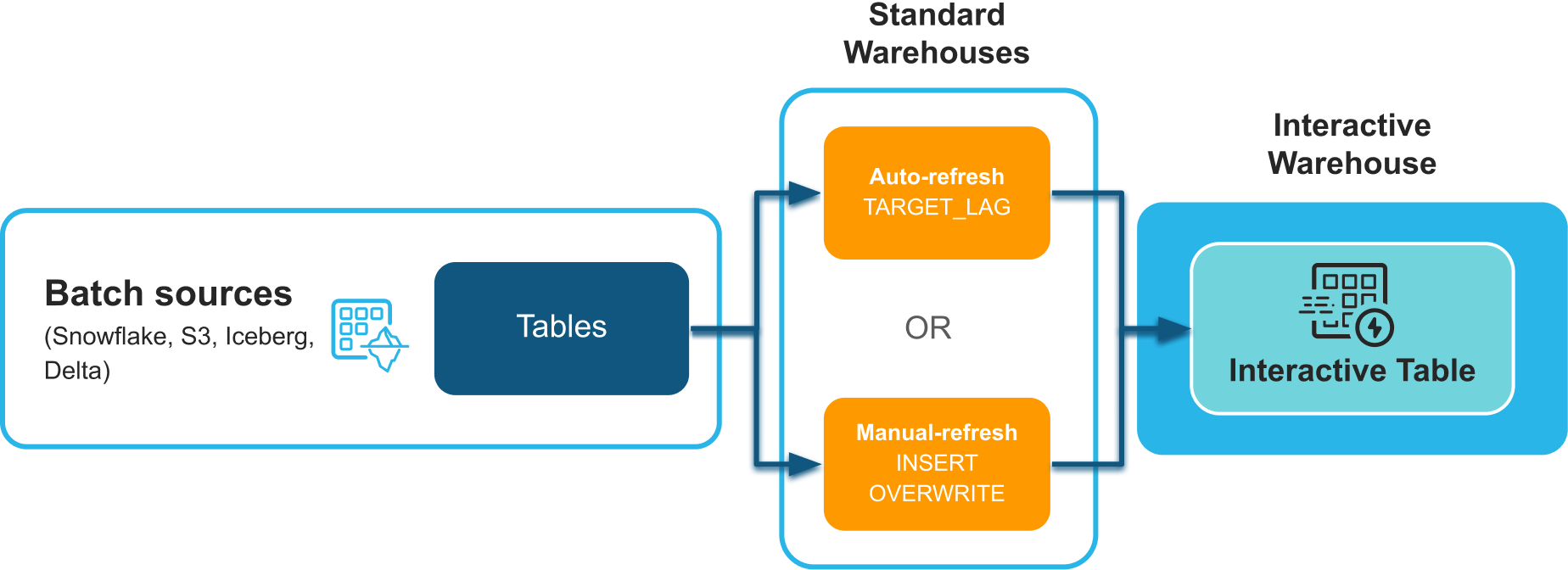
The interactive warehouse (and the interactive table attached to it) effectively function as a middle layer for the LWC.
Of course, there are plenty alternative options for such a middle layer, but I wanted to test interactive warehouses anyway, so let's stick with them. Still, here are some alternatives I considered:
duckdb-wasmin the LWC connecting to Motherduck, but Salesforce doesn't set the COOP/COEP headers Wasm needs, and I didn't find any knob for it- PostgreSQL + PostgREST should work, just like Supabase or Neon would, too
- Substituting PostgREST with a worker (on Cloudflare or Fly.io or whatever), with a backend database that could be almost anything; for instance, Motherduck behind a Cloudflare worker
Anyway, back to interactive warehouses...
The setup: warehouse, interactive table, binding
Interactive warehouses can only query interactive tables: not standard tables, not views, not hybrid tables. So the setup is three steps: create the warehouse, materialize the data as an interactive table, and bind the two together.
First the warehouse itself:
CREATE INTERACTIVE WAREHOUSE WH_INTERACTIVE WITH
    WAREHOUSE_SIZE = 'XSMALL'
    AUTO_SUSPEND = 86400        -- 24h minimum
    AUTO_RESUME = TRUE
    INITIALLY_SUSPENDED = TRUE;

GRANT USAGE ON WAREHOUSE WH_INTERACTIVE TO ROLE READER;
XS is the smallest size available. For my workload (per-contact lookups over 16.5M rows clustered on the right key) it is already plenty, so I can easily add additional workloads.
AUTO_SUSPEND for an interactive warehouse is 86400 seconds (24h). That is the smallest value the warehouse itself accepts. For finer control (e.g. suspend at 18:00 every evening), a separate scheduled ALTER WAREHOUSE ... SUSPEND task is needed.Next, the interactive table. I materialize it from an existing curated view, clustered on the two columns I actually filter by:
CREATE OR REPLACE INTERACTIVE TABLE CONSUME.SALESFORCE_EMBED.IT_CONTACT_TOUCHPOINTS
    CLUSTER BY (id, date)
AS
SELECT id, date, touchpoint, label, link, icon
FROM CONSUME.SALESFORCE_EMBED.V_CONTACT_TOUCHPOINTS
WHERE date >= DATEADD(day, -400, CURRENT_DATE);The 400-day trailing window fits the UI use case: the timeline only renders recent touchpoints. Clustering by (id, date) is what makes per-contact reads actually interactive (assuming good clustering depth): the engine touches only the micro-partitions for one contact instead of scanning the whole table.
Finally, the binding step:
ALTER WAREHOUSE WH_INTERACTIVE
    ADD TABLES (CONSUME.SALESFORCE_EMBED.IT_CONTACT_TOUCHPOINTS);
This one is easy to miss. Without it, queries come back with 010402 Table IT_CONTACT_TOUCHPOINTS is not bound to the current warehouse. The binding also doesn't survive CREATE OR REPLACE, so if the table is refreshed by rebuilding, the refresh task has to re-run the ALTER WAREHOUSE line after rebuilding the table.
Does the SQL REST API actually work against one?
The Snowflake docs list a handful of supported access paths for interactive warehouses (worksheets, Snowsight, a few client libraries) and pointedly do not mention the SQL REST API. But that is exactly what my Salesforce Apex (underlying the LWC) calls out to. If the SQL API did not work against interactive warehouses, this whole architecture would have fallen over.
So I tested it. I issued a Programmatic Access Token for a dedicated service user, attached a network policy allowing my Salesforce instance (sandbox and production pod's outbound IPs) in, and fired a POST /api/v2/statements with warehouse: WH_INTERACTIVE and the user's role in the body.
It works: Sub-second end-to-end from the Lightning Web Component to Snowflake and back, over a perfectly ordinary Apex HTTP callout.
Worth it?
The shape is finally obvious to me: interactive warehouse + interactive table + SQL API = (relatively) cheap, warm, sub-second reads from any HTTP-speaking caller.
And that's it: a small feature with a 40% price cut, a quirky binding model (well, replicating to an external system has its quirks, too), and full SQL API support. I'll be reaching for interactive warehouses whenever I need warm, cheap, sub-second reads from a user-facing surface. 🤓