
70 dlt pipelines, zero comments (and no alert when the schema changed)
Nobody documents dozens of tables with hundreds of columns by hand. So an agent does it, INFORMATION_SCHEMA keeps it honest, and Teams pings when a source API adds a column


TL/DR: I built an agent to generate COMMENT ON TABLE / COMMENT ON COLUMN for tables ingested into Snowflake by my dlt pipeline. And while I was at it I made dltHub jobs notify me on schema changes.
Roughly 70 dltHub pipelines load data into my RAW database in Snowflake directly from source APIs: Microsoft Graph, Salesforce, and a raft of many other (usually REST) endpoints. RAW is the landing zone, so its schema reflects whatever the upstream API returned. Buuut... column names by themselves don't necessarily explain what a field means (particularly if the source is an ERP system 😜) or where it originated from or which edge cases to keep an eye on (nullable for only one subtype, drives incremental logic, undocumented upstream, etc.). I won't elaborate on why this might be useful to have here, just take an educated guess...
Nobody enjoys writing COMMENT ON TABLE manually across 70 pipelines. Well, at least I don't, but I presume that's the case for most places 😅 So the goal of this: an agent that inspects the pipeline's own source, any source-API docs that exist, and the live Snowflake schema as ground truth, can produce comment text that's accurate enough and cheap enough that "every pipeline documented" becomes normal rather than aspirational.
Why dlt and Snowflake can't fill the gap themselves
A plain dlt pipeline alone lacks the context. It sees a column name and type, but it doesn't read the source API documentation on its own. Similarly, Snowflake knows types, not semantics. Meaning has to come from something that actually consumed the source system's docs, or holds general knowledge of that system's schema. That's what an agent contributes, and no warehouse tooling can supply unaided.
👉 dlthub.com/features/ai-harness
Any column with no documentation source could get a frank "not documented in the source API spec". The destination's INFORMATION_SCHEMA.COLUMNS is the guardrail for what really exists... source docs might go stale, the live schema doesn't.
This is one of my Snowflake tables before adding comments:
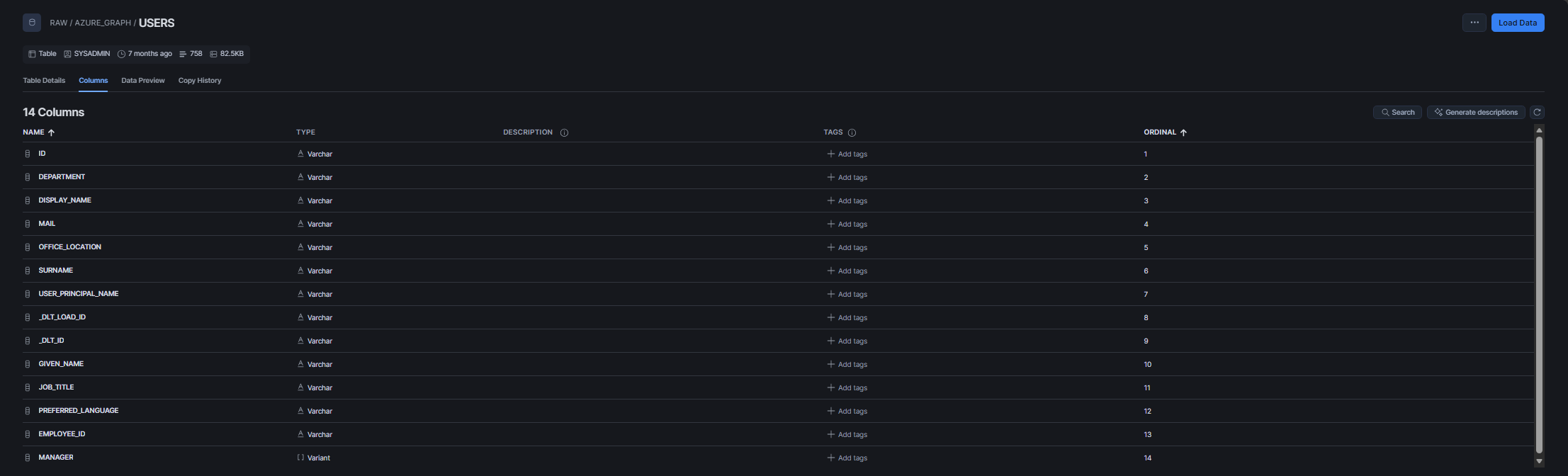
A dumb mechanism
First, I needed something to apply the table and column descriptions to each Snowflake table. The code that applies those is deterministic: All the reading, cross-referencing, and composition lives upstream in a skill (we're getting to this in a bit). The runtime code does exactly one thing: read a JSON shaped like {table: {table_comment, columns: {col: text}}} and apply it.
def set_table_comments(
    schema: str,
    table: str,
    table_comment: str,
    column_comments: dict[str, str],
    database: str = "RAW",
) -> None:
    fqn = f'{database}."{schema}"."{table}"'
    with snowflake_engine().begin() as conn:
        conn.execute(text(f"COMMENT ON TABLE {fqn} IS :c"), {"c": table_comment})
        for column, comment in column_comments.items():
            conn.execute(
                text(f'COMMENT ON COLUMN {fqn}."{column}" IS :c'), {"c": comment}
            )
COMMENTS_DIR = Path(__file__).parent / "comments"
def apply_table_comments(schema: str, database: str = "RAW") -> None:
spec = json.loads((COMMENTS_DIR / f"{schema}.json").read_text(encoding="utf-8"))
for table, table_spec in spec.items():
set_table_comments(
schema=schema,
table=table,
table_comment=table_spec["table_comment"],
column_comments=table_spec.get("columns", {}),
database=database,
)This replicates a pattern I already use for Snowflake object tagging: every dlt-managed table already carries META.TAG.TRIGGERED_BY = 'dlt' from a tag_dlt_managed_tables() helper in the same shared _snowflake_common.py module.
 Martin Seifert
So I'll need one JSON file comments/<pipeline_name>.json per pipeline that keeps all comment text out of the pipeline itself. Wiring the new (shared) module into the pipeline is a single line:
load_info = pipeline.run(azure_graph_source(), loader_file_format="jsonl")
print(load_info)

apply_table_comments(schema=pipeline.dataset_name)
tag_dlt_managed_tables(schema=pipeline.dataset_name)
The skill writing the JSON
Producing the comment needs a little judgment (agentic and/or human). So I put it in a repeatable agent skill:
- read the pipeline source for table names
- query Snowflake's
INFORMATION_SCHEMA - diff the live columns against the existing JSON file containing the comments and add comments for what's new (a column that already has a comment may have been hand-edited)
Example: Microsoft Graph API
I tested this pattern on my azure_graph_to_snowflake.py pipeline: six tables (users, signins, groups, groupmembers, messages, messages_deleted) from Microsoft Graph API v1.0, landing in RAW.AZURE_GRAPH. The API is fairly well documented publicly, so all 123 column comments I wanted to add came from the agent's knowledge of the public, stable Graph resource schemas. If the API documentation is somewhere else, it's a good idea to point the agent to it at this step 😉
This exercise incidentally produced an actually meaningful comment for groupmembers on something I didn't realize before: Those contain 38 columns, a heterogeneous mix of user-shaped fields (given_name, job_title, mobile_phone) next to group-shaped fields (mail_enabled, group_types, membership_rule) with no obvious reason for the mix from column names alone. Why? Microsoft Graph's /groups/{id}/members endpoint returns mixed directory-object types... a group member can be a user, a group, or some other object. My dlt pipeline flattens every field it has ever seen from that union into one table. That observation came from reading the pipeline's own source config plus the agent's domain knowledge. And it became the table comment.
And then the first run failed
After using the skill and adding the JSON file, running the module for the first time failed. That failure (as they usually do) taught me more than an immediate clean pass ever could... The invocation of azure_graph_to_snowflake ran into this:
snowflake.connector.errors.ProgrammingError: 002003 (02000): SQL compilation error:
Schema 'RAW."azure_graph"' does not exist or not authorized.
[SQL: COMMENT ON TABLE RAW."azure_graph"."users" IS %(c)s]
The dlt load itself had already completed at this point with "no failed jobs" logged immediately before this traceback. So it must have been the new comment step.
Root cause: set_table_comments() built its fully-qualified name as f'{database}."{schema}"."{table}"', quoting schema and table exactly as passed in. But pipeline.dataset_name is "azure_graph"... dlt's convention sets that to lower case. A quoted SQL identifier is case-sensitive, but the Snowflake schema had been created unquoted, which Snowflake uppercases (to AZURE_GRAPH) by default. Quoting the lowercase string turned the identifier lookup into one that could never succeed.
Fixed by one line per identifier:
fqn = f'{database}."{schema.upper()}"."{table.upper()}"'
...
conn.execute(text(f'COMMENT ON COLUMN {fqn}."{column.upper()}" IS :c'), {"c": comment})And this is the table from earlier after the comments are added:
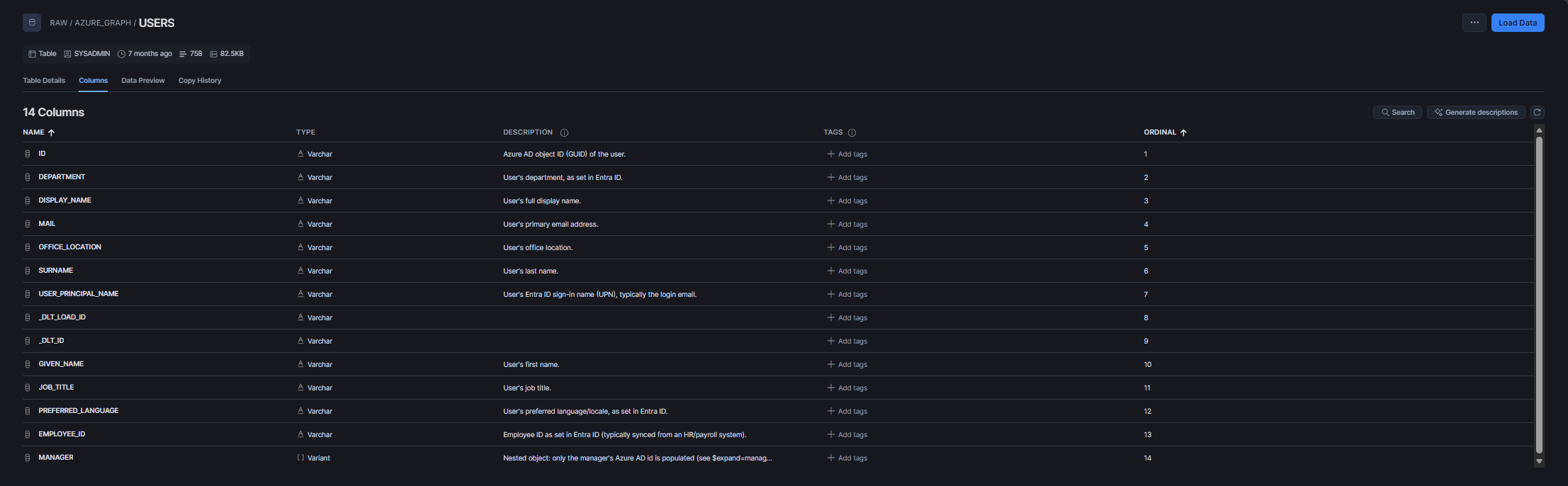
Schema drift now gets a notification
Then a second gap surfaced: When do I actually trigger that skill? I already trigger notifications to Teams when a pipeline job fails:
 Martin Seifert
But so far nothing fired when a pipeline succeeded and quietly picked up a new column along the way. Which is good and what dlt is designed to do! However, if a new column is added, it might need a new comment (or it might signal an upstream API contract silently shifting shape I would like to know about). So I added another module to my pipelines:
def notify_schema_changes(load_info, pipeline_name: str) -> None:
    if load_info.first_run:
        return
    changes = []
    for pkg in load_info.load_packages:
        for table_name, table in (pkg.schema_update or {}).items():
            if table_name.startswith("_dlt"):
                continue
            columns = list((table.get("columns") or {}).keys())
            changes.append(f"{table_name}: {', '.join(columns) if columns else '(new table)'}")
    if not changes:
        return
    try:
        send_teams_message(
            f"Schema change: {pipeline_name}",
            "New tables/columns detected:\n" + "\n".join(f"- {c}" for c in changes),
        )
    except Exception as e:
        from dlt.common import logger
        logger.warning(f"Could not send schema-change notification for {pipeline_name}: {e}")
load_info.load_packages[i].schema_update is dlt's own record of what was changed during a load, first_run is a simple boolean dlt already tracks, used here to suppress the expectable "everything here is new" noise on a new pipeline's first load. And with this the pipeline gets has a third downstream task:
load_info = pipeline.run(azure_graph_source(), loader_file_format="jsonl")
print(load_info)

apply_table_comments(schema=pipeline.dataset_name)
tag_dlt_managed_tables(schema=pipeline.dataset_name)
notify_schema_changes(load_info, pipeline_name=pipeline.pipeline_name)
Why not centralized in the @job decorator
Since my on-failure-notifications already live in one decorator wrapping every dltHub trampoline, the obvious move would have been to centralize those schema-change-notifications the same way by wrapping the job function and check if it returns a LoadInfo. But...
A dltHub job executes in fresh stateless container on every invocation. A decorator sitting outside the pipeline function has no "before" state to compare against... pipeline.sync_destination() is only called inside the pipeline function itself and restores prior state from the destination. Hence, only code running after that call (only the pipeline function itself via the load_info computed by pipeline.run()) has a real diff.
Because of this, the schema change notifier has to live inside each pipeline. Not ideal, but I hereby leave some room for improvement to the dltHub folks if they decide to pick it up 😜
What's left to do
The mechanism is the same for each pipeline: only the JSON changes, adding/modifying a pipeline means a skill invocation plus reviewing the diff.
And I leave one gap here for now: a column that disappears from a source but still has an entry in comments/<pipeline>.json isn't pruned. apply_table_comments would try COMMENT ON COLUMN against a no longer existent column (if it also was removed from the destination... which doesn't happen unless the pipeline is reset) and Snowflake would reject it. The skill flags this case for human review instead of quietly deleting the stale entry, but there's no automatic cleanup yet.
And that's it: my destination tables have comments now, and a source API that grows a column doesn't get to do it quietly anymore 😌
The skill
---
name: annotate-table-comments
description: Derive and apply COMMENT ON TABLE/COLUMN text for a dlt pipeline's Snowflake-destination tables. Use when the user asks to document/annotate/comment a pipeline's tables or columns in Snowflake. Do NOT use for CDM/business-concept mapping (that's the separate `annotate-sources` skill) — this skill only produces warehouse-catalog comment text grounded in source docs and live schema.
argument-hint: "[pipeline_module]"
---

# Annotate table comments

Produce `comments/<schema>.json` (keyed by the pipeline's destination Snowflake schema, not its module name — see step 1) and wire it into the pipeline's script, so `COMMENT ON TABLE`/`COMMENT ON COLUMN` reflect what the data actually means — not just column names.

Parse `$ARGUMENTS`: `pipeline_module` — the pipeline's `.py` filename stem (e.g. `deinadieu_to_snowflake`). Ask if not given. This names the pipeline *script* to read; the comments file itself ends up named after that pipeline's `dataset_name`, which step 1 finds.

## Steps

### 1. Read the pipeline script

Read `<pipeline_module>.py`. Note: destination database (default `RAW`, check for an override like `salesforce_fields_to_snowflake.py` → `META`), `dataset_name` (the Snowflake schema), resource/table names, `write_disposition`, and any watermark/incremental logic worth mentioning in the table comment.

### 2. Get the live column list (ground truth)

Source docs can be stale or incomplete. Query the actual table:

```sql
select table_name, column_name, data_type, comment
from <database>.information_schema.columns
where table_schema = '<DATASET_NAME_UPPER>'
order by table_name, ordinal_position
```

Use `snow sql -c <connection> -q "..." --format json` (check `snow connection list` for the right connection name) or the equivalent MCP/dlt tool if available. Skip `_dlt_loads`, `_dlt_version`, `_dlt_pipeline_state` and other `_dlt*` tables — those are dlt internals, not business tables, and don't need comments.

### 3. Check for an existing comments file — first run vs. update

Read `comments/<dataset_name>.json` if it exists (`dataset_name` from step 1 — the file is keyed by Snowflake schema, not pipeline module, since multiple pipelines can share one schema). This changes what step 4 does:

- **No file (first pipeline to document this schema):** derive comments for every table/column found in step 2.
- **File exists (either this same pipeline re-triggered after a schema-change Teams notification, or a *different* pipeline that already writes into this schema and was documented first):** diff the live column set from step 2 against the file's `columns` keys per table.
  - New table or new column → derive comment text for it (step 4).
  - Column already in the file → **leave its text untouched.** It may have been hand-edited since you last wrote it; don't regenerate wording for something nobody asked you to revise.
  - Column in the file but no longer in the live schema (dropped upstream, or the field was renamed) → flag it to the user in step 5, don't silently delete. A stale `COMMENT ON COLUMN` for a dropped column would fail at apply time (Snowflake errors on a nonexistent column), so this needs a decision, not an auto-fix.
  - If the user explicitly asks to revise an existing comment, treat that column as "new" for this run.

### 4. Write the comment text

For each table/column that needs new or updated text (per step 3):
- **`table_comment`**: what a row represents, where it comes from (source system + endpoint), and anything about the load pattern worth knowing (merge key, incremental watermark, write_disposition quirks)
- **`columns`**: one comment per column that has a documented or reasonably inferable meaning

**Never fabricate certainty.** For any column not covered by source docs, still write a best-effort description from the name/type/context, but end it with something like *"Not documented in the source API spec."* — that's honest, not hedging-for-its-own-sake; it tells the next reader where the information gap actually is.

### 5. Present for approval before writing the file

Show the user what you derived before touching the JSON:
- **First run:** the full `table_comment` + all column comments.
- **Update:** only the delta — new tables, new columns, and (separately) any stale columns from step 3 that need a decision (drop the entry / keep it / something else). Don't re-list unchanged existing comments; the point of the diff is not re-litigating what's already approved.

Wait for confirmation or corrections. Then write/merge into `comments/<dataset_name>.json`:

```json
{
  "<table_name>": {
    "table_comment": "...",
    "columns": {
      "<column_name>": "...",
      ...
    }
  }
}
```

Multiple tables in the same schema are multiple top-level keys in the same file — including tables written by a *different* pipeline sharing this schema. On an update, merge into the existing structure — don't overwrite untouched entries.

### 6. Wire the pipeline script (only if not already wired)

If not already present, add to `<pipeline_module>.py`:

```python
from _snowflake_common import apply_table_comments, tag_dlt_managed_tables
```

and, right after `pipeline.run(...)` / `print(load_info)`:

```python
apply_table_comments(schema=pipeline.dataset_name)
tag_dlt_managed_tables(schema=pipeline.dataset_name)
```

Pass `database=...` to `apply_table_comments` too if the pipeline overrides the destination database. Skip this step when the pipeline already calls `apply_table_comments` — true on every update, and also true on a first run for this schema's *comments*, if a different pipeline sharing the same schema already wired it in.

### 7. Ask about deployment

dltHub bakes workspace files (including `comments/*.json`) into the runtime image at deploy time — same as `secrets.toml` (see `AGENTS.md` → Deployment). Editing/writing the JSON locally has **no effect on the next scheduled run** until redeployed. After step 6/7, ask the user:

- **Deploy now** — `dlthub deploy --non-interactive` from `dlt/dltHub/`. Takes effect on the pipeline's normal schedule.
- **Deploy later** — leave it staged locally; say so explicitly so it's not mistaken for already live.

This is a separate question from *running* the pipeline. Don't trigger an actual `dlthub job run` / local `python <pipeline_module>.py` execution as part of this skill unless the user separately asks to apply the comments immediately rather than waiting for the next scheduled run — that's a prod write (`COMMENT ON TABLE/COLUMN` against the real Snowflake destination), cheap and reversible, but confirm first.

## Output

- `comments/<dataset_name>.json` — created or updated (merge, not overwrite, on existing files)
- Pipeline script updated to call `apply_table_comments` (+ `tag_dlt_managed_tables` if missing) — only if it wasn't wired already
- Deployed via `dlthub deploy --non-interactive`, or explicitly left staged, per user's answer in step 7
License
This is free and unencumbered software released into the public domain.
Anyone is free to copy, modify, publish, use, compile, sell, or
distribute this software, either in source code form or as a compiled
binary, for any purpose, commercial or non-commercial, and by any
means.
In jurisdictions that recognize copyright laws, the author or authors
of this software dedicate any and all copyright interest in the
software to the public domain. We make this dedication for the benefit
of the public at large and to the detriment of our heirs and
successors. We intend this dedication to be an overt act of
relinquishment in perpetuity of all present and future rights to this
software under copyright law.
THE SOFTWARE IS PROVIDED "AS IS", WITHOUT WARRANTY OF ANY KIND,
EXPRESS OR IMPLIED, INCLUDING BUT NOT LIMITED TO THE WARRANTIES OF
MERCHANTABILITY, FITNESS FOR A PARTICULAR PURPOSE AND NONINFRINGEMENT.
IN NO EVENT SHALL THE AUTHORS BE LIABLE FOR ANY CLAIM, DAMAGES OR
OTHER LIABILITY, WHETHER IN AN ACTION OF CONTRACT, TORT OR OTHERWISE,
ARISING FROM, OUT OF OR IN CONNECTION WITH THE SOFTWARE OR THE USE OR
OTHER DEALINGS IN THE SOFTWARE.
For more information, please refer to https://unlicense.org/